ShipMyCar MCP Quote Guide
ShipMyCar's AI quote connector lets AI assistants such as Claude collect vehicle and route details in a normal conversation, ask for anything missing, and return a ShipMyCar transport quote with a link to continue. It can help car buyers, dealers, marketplaces and support teams get a realistic delivery estimate without leaving the assistant they are already using.
Example chat
Ask in plain English
You
I need a quote to move a 2020 Ford Mustang from Tring to Milton Keynes.
AI assistant
I can help. What is the collection address, delivery postcode and rough vehicle value?
ShipMyCar connector
Returns the quote, key details and a link to continue on ShipMyCar.
Who it is useful for
It is for anyone who wants to turn a vehicle transport question into a clear next step without copying details between different systems.
Car buyers
Ask an AI assistant for a transport estimate while you are looking at a vehicle, advert or auction lot.
Dealers and marketplaces
Help buyers understand the likely delivery cost before they enquire or commit to a purchase.
Support and relocation teams
Collect the right transport details in a normal conversation and hand customers to ShipMyCar when ready.
A quote conversation that actually gets to a quote
The connector listens for the details ShipMyCar needs, asks for anything missing, and gives the AI assistant a structured answer it can explain clearly.
Collects quote details
It can ask for the collection place, delivery place, vehicle details, value and anything else needed.
Builds a transport quote
Once the details are ready, it returns a ShipMyCar estimate using our existing quote system.
Gives a continuation link
The customer can open the quote on ShipMyCar to check the details and continue from there.
Supports enabled logistics modules
The connector follows the same enabled ShipMyCar quote modules as the public API, including transport, HMRC, DVLA and destination-cost options where available.
Connect it to Claude
MCP is a standard way for an AI assistant to use tools from a website. In this case, the tool is ShipMyCar quoting.
- 1
Open Claude or another AI app that supports custom MCP connectors.
- 2
Go to the connector settings and choose to add a custom connector.
- 3
Use ShipMyCar as the name and paste in the connector URL.
- 4
Do not add an OAuth Client ID unless your AI app specifically asks for one.
- 5
Start a new chat and ask for a vehicle transport quote.
Connector URL
https://www.shipmycar.co.uk/mcp
Use this URL when your AI app asks for the MCP server or connector address.
If the app asks for sign-in details, leave OAuth or Client ID fields blank unless you have been given separate instructions by ShipMyCar.
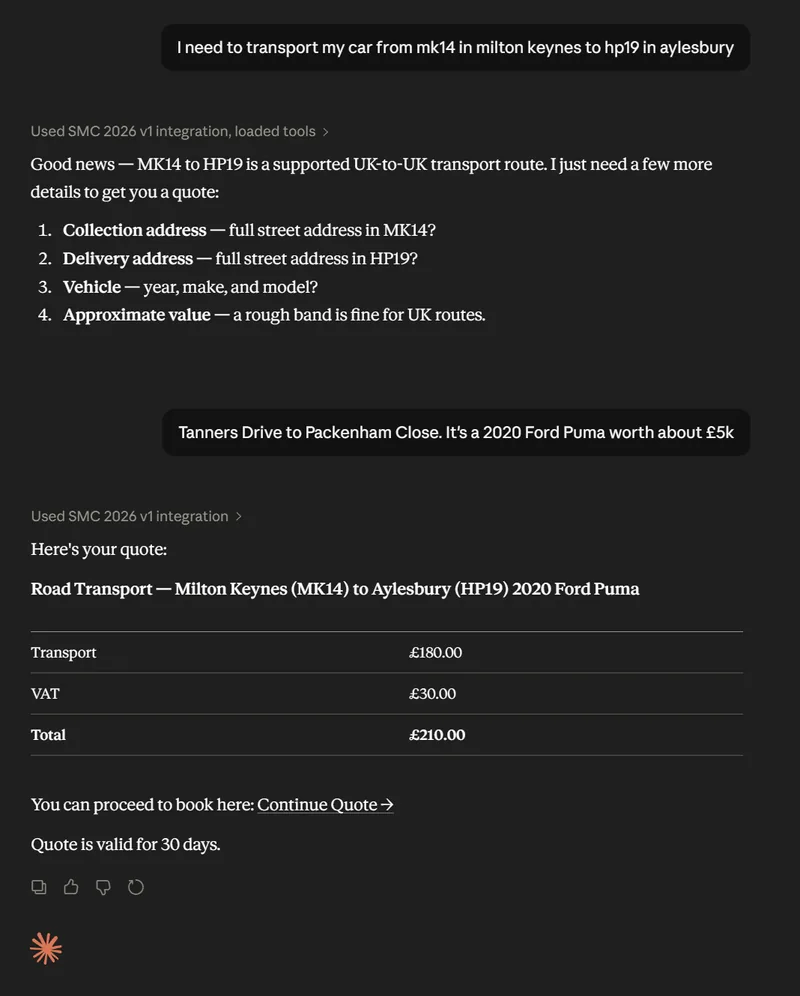
Start with a normal transport question
You do not need to format it like an API request. Write the way a customer would ask for help.
Example prompt
"I need a quote to transport a 2020 Ford Mustang from High Street, Tring to MK14 5BN. It is worth about £20,000."
If something is missing, the assistant should ask a follow-up question before trying to generate the quote.
Good to know
The connector is designed for clear lead generation first. It helps produce a quote and a next step, without forcing every customer into a full checkout flow.
The connector does not email quotes automatically.
It returns quote details and a link to continue on ShipMyCar.
It supports the enabled ShipMyCar route and service modules available through the quote platform.
Transport, HMRC customs, DVLA registration and destination-cost options are handled where the route and service are available.